> ## Documentation Index
> Fetch the complete documentation index at: https://docs.allium.so/llms.txt
> Use this file to discover all available pages before exploring further.
# Create a parameterized query
> Build reusable queries with configurable parameters for flexible data analysis.
Parameterized queries allow you to create reusable SQL templates with configurable values. Instead of writing multiple similar queries, you can define parameters that can be changed each time you run the query.
## How to Use Parameters
Replace any value in your query with `{{param_name}}` to create a parameter. The query editor will automatically detect these parameters and provide input fields for them.
Use double curly braces to define parameters in your SQL query:
```sql theme={null}
-- DEX USD volume for a configurable chain and time period
select
date(block_timestamp) as date,
chain,
sum(usd_amount) as usd_volume
from crosschain.dex.trades
where
block_timestamp >= current_timestamp - interval '{{last_n_days}} days'
and chain = '{{chain}}'
group by all
order by date asc;
```
The query editor automatically detects parameters and displays input fields. Enter your desired values:
* **last\_n\_days**: `3`
* **chain**: `solana`
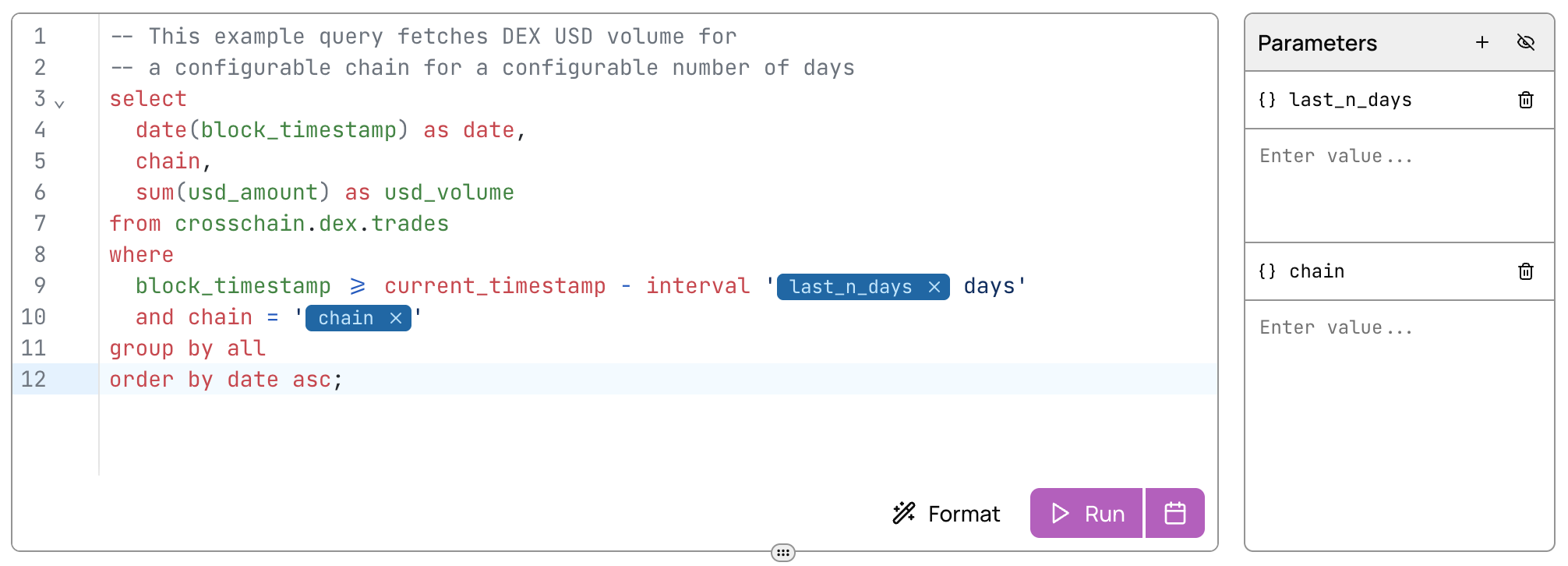 Click **Run** to execute the query with your parameter values. You can modify the parameters and re-run the query to analyze different chains, time periods, or other variables without rewriting the SQL.
## Advanced Parameter Techniques
Parameters become even more powerful when using the [Explorer API](/api/explorer/overview) to run queries programmatically. You can dynamically set parameter values in your API requests to create flexible data pipelines and applications.
This enables:
* Automated data pulls with variable filters
* User-driven dashboards and reports
* Dynamic data exports based on business logic
**Power User Tip:** You can parameterize an entire SQL query by using `{{sql}}` as the query text:
```sql theme={null}
{{sql}}
```
When calling the API, provide the complete SQL as the parameter value. This enables dynamic query generation and execution without modifying the saved query.
**Use cases:**
* Applications that generate queries based on user input
* A/B testing different query approaches without the Allium App interface
* Programmatically building complex queries with conditional logic
## Next Steps
Learn the fundamentals of running queries
Build on top of completed query runs
Execute parameterized queries programmatically
Create charts and visualizations from query results
Click **Run** to execute the query with your parameter values. You can modify the parameters and re-run the query to analyze different chains, time periods, or other variables without rewriting the SQL.
## Advanced Parameter Techniques
Parameters become even more powerful when using the [Explorer API](/api/explorer/overview) to run queries programmatically. You can dynamically set parameter values in your API requests to create flexible data pipelines and applications.
This enables:
* Automated data pulls with variable filters
* User-driven dashboards and reports
* Dynamic data exports based on business logic
**Power User Tip:** You can parameterize an entire SQL query by using `{{sql}}` as the query text:
```sql theme={null}
{{sql}}
```
When calling the API, provide the complete SQL as the parameter value. This enables dynamic query generation and execution without modifying the saved query.
**Use cases:**
* Applications that generate queries based on user input
* A/B testing different query approaches without the Allium App interface
* Programmatically building complex queries with conditional logic
## Next Steps
Learn the fundamentals of running queries
Build on top of completed query runs
Execute parameterized queries programmatically
Create charts and visualizations from query results