> ## Documentation Index
> Fetch the complete documentation index at: https://docs.allium.so/llms.txt
> Use this file to discover all available pages before exploring further.
# Configuration reference
> Guide to configuring Beam pipelines in the Allium App.
A Beam pipeline has three components that data flows through in order:
```text theme={null}
source → transforms[] → sinks[]
```
For the full schema reference (field types, required vs optional, all sink/transform variants), see the [API configuration reference](/beam/api-reference/configuration).
## Source
Select a blockchain and entity type to stream. Enable **zerolag** to stream from the tip of the chain before finality (lower latency, may include reorged data).
To see supported chains and entities, open the [Beam page](https://app.allium.so/build/beam), click **New**, select the **Source** node, and expand the chain and entity dropdowns. If the chain or entity you need is not listed there, check the [Datastreams catalog](https://app.allium.so/build/datastreams) and contact [support@allium.so](mailto:support@allium.so) to check if it can be supported.
## Transforms
Two transform types are available. You can chain multiple transforms together — data flows through them in order.
### Set filter
Filter data by matching field values against a set. Only records whose extracted field value exists in your set pass through. Sets can hold **10M+ values**.
**Bloblang `filter_expr` examples:**
```bloblang theme={null}
root = this.address # Filter by contract address
root = this.topic0 # Filter by event signature
root = this.from_address # Filter by sender address
root = this.to_address # Filter by recipient address
```
When filtering by **addresses, labels, or symbols**, use **lowercase** values. This is how these values are normalized in our system.
#### Managing filter values
Filter values are managed separately from the pipeline config — add, remove, replace, and browse values through the **UI** or the [filter values API](/beam/api-reference/filter-values/list-filter-values). This decouples value management from pipeline configuration and allows sets to scale to millions of entries.
In the UI, click **Edit** on a set filter node to open the filter set editor.
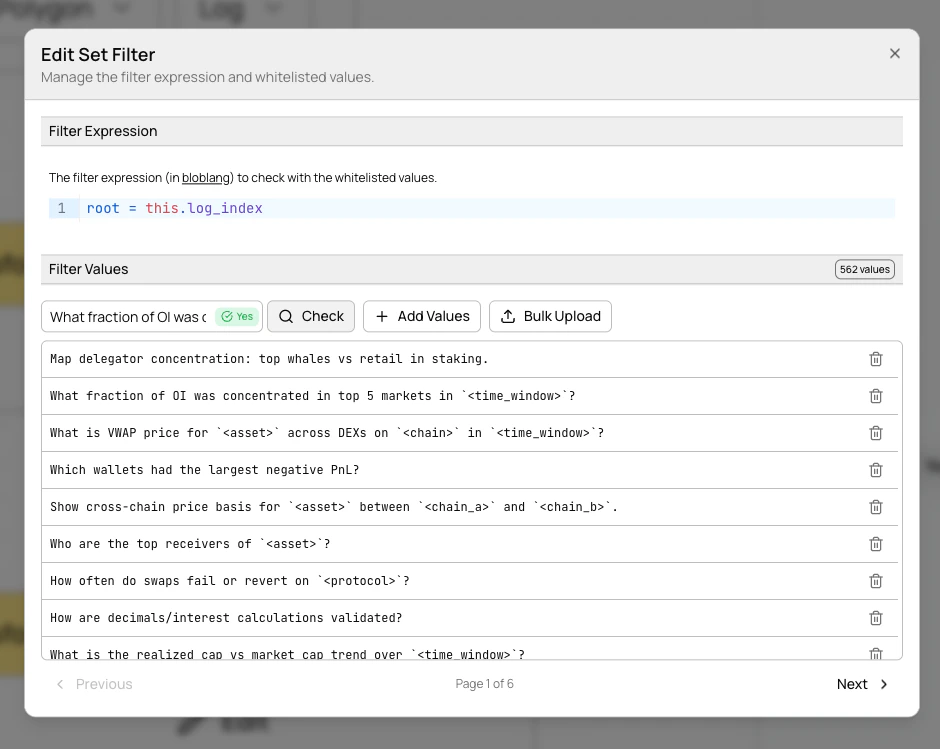 From there you can:
* **Browse values** with paginated navigation (100 per page)
* **Add individual values** via the text input
* **Remove values** with the trash icon
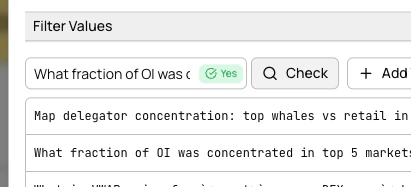
* **Check membership** by entering a value and seeing an instant result indicator
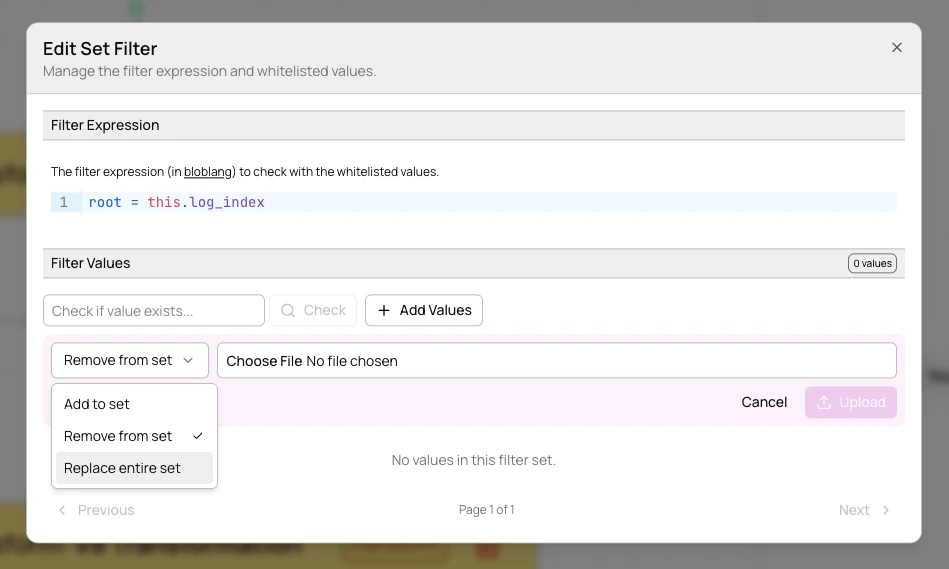
* **Bulk upload** from `.txt` or `.csv` files with add, remove, or replace modes
From there you can:
* **Browse values** with paginated navigation (100 per page)
* **Add individual values** via the text input
* **Remove values** with the trash icon
* **Check membership** by entering a value and seeing an instant result indicator
* **Bulk upload** from `.txt` or `.csv` files with add, remove, or replace modes
 Filter values persist across pipeline deploys and teardowns. They are only deleted when the transform or pipeline config is deleted.
### JavaScript (v8)
Transform data using JavaScript. Your function receives each record and can modify, enrich, or reshape it. Return `null` to drop a record.
**Example** — add a transfer size tag:
```javascript theme={null}
function transform(record) {
const amount = parseFloat(record.amount || "0");
if (amount > 1000000) {
record.size_tag = "whale";
} else if (amount > 10000) {
record.size_tag = "medium";
} else {
record.size_tag = "small";
}
return record;
}
```
## Sinks
Sinks define where your processed data is delivered. Five sink types are available: **Kafka**, **SNS**, **External Kafka**, **Webhook**, and **NATS JetStream**.
For full field reference and configuration details for each sink type, see the [API configuration reference](/beam/api-reference/configuration#sinks).
### External Kafka sinks
Deliver data to your own Kafka cluster instead of Allium-managed infrastructure.
Filter values persist across pipeline deploys and teardowns. They are only deleted when the transform or pipeline config is deleted.
### JavaScript (v8)
Transform data using JavaScript. Your function receives each record and can modify, enrich, or reshape it. Return `null` to drop a record.
**Example** — add a transfer size tag:
```javascript theme={null}
function transform(record) {
const amount = parseFloat(record.amount || "0");
if (amount > 1000000) {
record.size_tag = "whale";
} else if (amount > 10000) {
record.size_tag = "medium";
} else {
record.size_tag = "small";
}
return record;
}
```
## Sinks
Sinks define where your processed data is delivered. Five sink types are available: **Kafka**, **SNS**, **External Kafka**, **Webhook**, and **NATS JetStream**.
For full field reference and configuration details for each sink type, see the [API configuration reference](/beam/api-reference/configuration#sinks).
### External Kafka sinks
Deliver data to your own Kafka cluster instead of Allium-managed infrastructure.
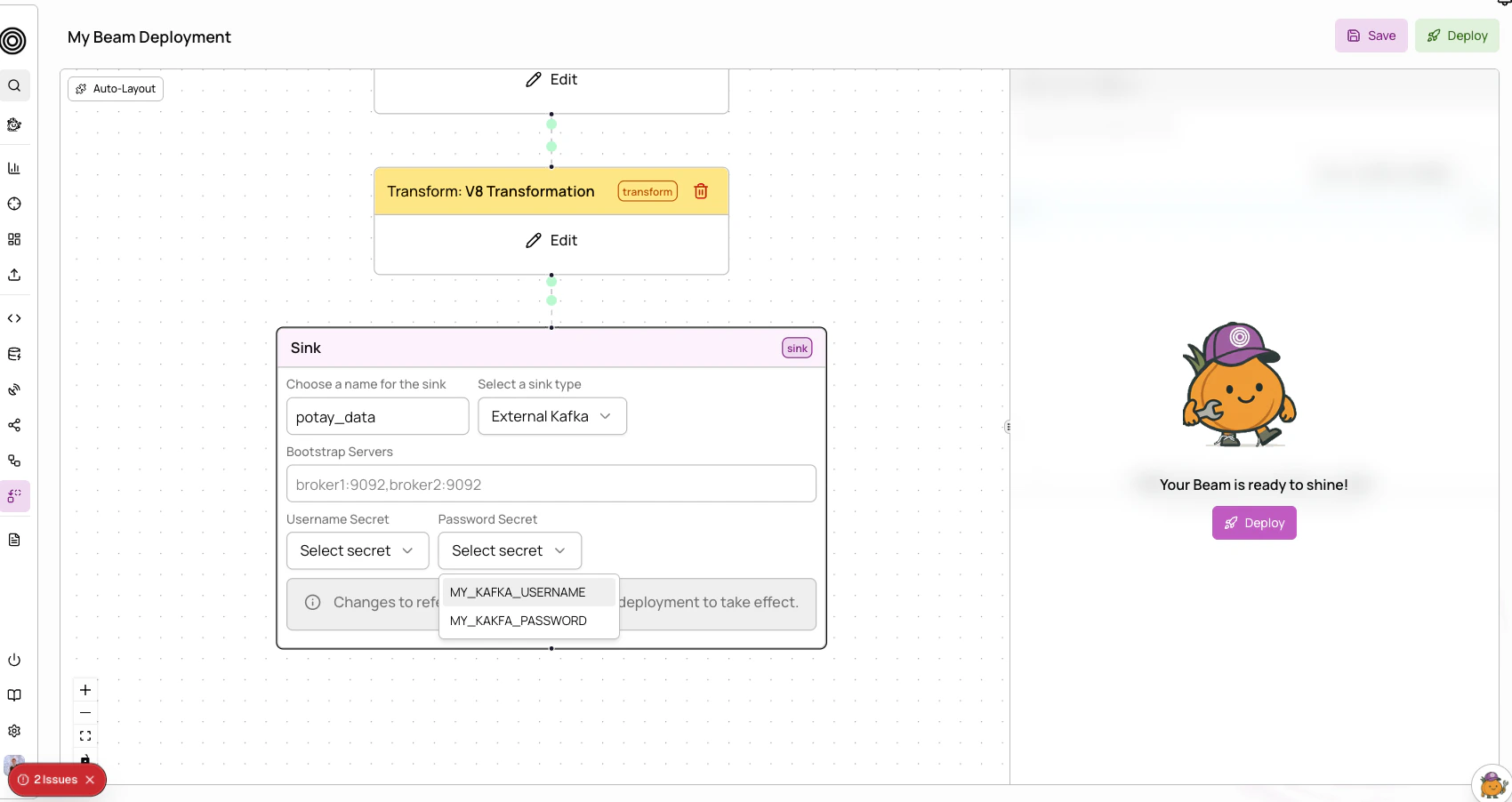
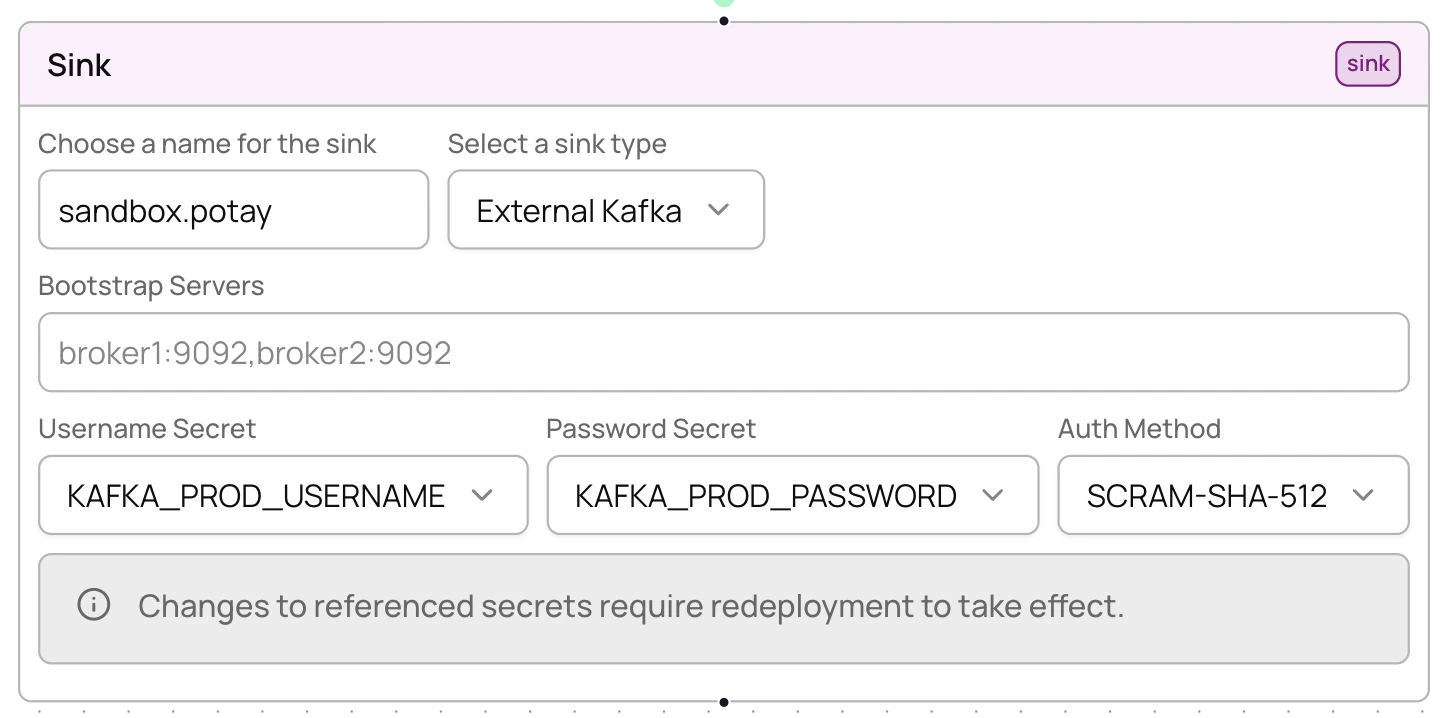 Credentials are stored as [organization secrets](/app/organization-management/secrets). Authentication uses **SASL\_SSL** as the security protocol.
If a referenced secret is updated after the pipeline was last deployed, Beam will flag the sink as **stale**. You must **redeploy** the pipeline for the new secret value to take effect.
### Webhook sinks
Deliver data to an HTTPS endpoint. Beam pushes each record as a POST request to your URL.
The webhook URL must use HTTPS. HTTP URLs are not supported.
For HMAC request signing and replay protection, see [Webhook authentication](/beam/webhook-authentication).
Set the optional `enable_http_encoding` field to `true` to have Beam zstd-compress each request body and add a `Content-Encoding: zstd` header to the POST. Your endpoint must decompress the payload before parsing. See the [webhook sink reference](/beam/api-reference/configuration#sinks) for the full field list.
### NATS JetStream sinks
Publish records to a NATS JetStream subject on a broker you operate. Configure the broker URL and the subject the pipeline publishes to — Bento interpolation (e.g. `${! json("chain") }`) is allowed inside the subject.
Authentication is token-based. Store the token as an [organization secret](/app/organization-management/secrets) and reference it via `token_secret_id`. If you omit the field, Beam connects to the broker without authentication.
Do not include the token in the `url`. If `token_secret_id` is set, Beam injects the resolved token into the connection at deploy time. For example, with a token secret resolving to `your-token`, `nats://your-broker.example.com:4222` becomes `nats://your-token@your-broker.example.com:4222` before the publisher connects.
If the referenced token secret is rotated after deployment, the sink is flagged as **stale**. You must **redeploy** for the new value to take effect.
See the [NATS JetStream sink reference](/beam/api-reference/configuration#sinks) for the full field list.
## Best practices
1. **Filter early** — apply set filters before JavaScript transforms to reduce data volume
2. **Start simple** — begin with basic filtering, add transforms incrementally
3. **Monitor after deploy** — always check worker health after deployment
4. **Test transforms** — validate JavaScript scripts handle edge cases (missing fields, unexpected types)
5. **Use descriptive names** — clear pipeline and sink names help track multiple pipelines
6. **Lowercase addresses** — always use lowercase when filtering by addresses, labels, or symbols
7. **Redeploy, don't teardown** — when updating a pipeline, just redeploy. It's idempotent with zero downtime.
8. **Manage filter values separately** — use the UI or [filter values API](/beam/api-reference/filter-values/list-filter-values) to add/remove values without touching the pipeline config
## Troubleshooting
### Unhealthy workers
If workers show as unhealthy:
1. Check that the pipeline config is valid (source chain/entity exists, filter expressions are syntactically correct)
2. Verify source data is available on the selected chain and entity
3. Update the config and redeploy (no teardown needed)
### OOM killed workers
If workers are being killed for out-of-memory:
1. Simplify JavaScript transforms to reduce memory usage
2. Add more aggressive filtering earlier in the pipeline to reduce data volume
3. Contact [support@allium.so](mailto:support@allium.so) for resource limit adjustments
### Crashing workers
If workers are in a crash loop:
1. Check JavaScript scripts for syntax errors
2. Verify filter expressions are valid Bloblang
3. Review transform logic for runtime errors (e.g., accessing undefined properties)
Credentials are stored as [organization secrets](/app/organization-management/secrets). Authentication uses **SASL\_SSL** as the security protocol.
If a referenced secret is updated after the pipeline was last deployed, Beam will flag the sink as **stale**. You must **redeploy** the pipeline for the new secret value to take effect.
### Webhook sinks
Deliver data to an HTTPS endpoint. Beam pushes each record as a POST request to your URL.
The webhook URL must use HTTPS. HTTP URLs are not supported.
For HMAC request signing and replay protection, see [Webhook authentication](/beam/webhook-authentication).
Set the optional `enable_http_encoding` field to `true` to have Beam zstd-compress each request body and add a `Content-Encoding: zstd` header to the POST. Your endpoint must decompress the payload before parsing. See the [webhook sink reference](/beam/api-reference/configuration#sinks) for the full field list.
### NATS JetStream sinks
Publish records to a NATS JetStream subject on a broker you operate. Configure the broker URL and the subject the pipeline publishes to — Bento interpolation (e.g. `${! json("chain") }`) is allowed inside the subject.
Authentication is token-based. Store the token as an [organization secret](/app/organization-management/secrets) and reference it via `token_secret_id`. If you omit the field, Beam connects to the broker without authentication.
Do not include the token in the `url`. If `token_secret_id` is set, Beam injects the resolved token into the connection at deploy time. For example, with a token secret resolving to `your-token`, `nats://your-broker.example.com:4222` becomes `nats://your-token@your-broker.example.com:4222` before the publisher connects.
If the referenced token secret is rotated after deployment, the sink is flagged as **stale**. You must **redeploy** for the new value to take effect.
See the [NATS JetStream sink reference](/beam/api-reference/configuration#sinks) for the full field list.
## Best practices
1. **Filter early** — apply set filters before JavaScript transforms to reduce data volume
2. **Start simple** — begin with basic filtering, add transforms incrementally
3. **Monitor after deploy** — always check worker health after deployment
4. **Test transforms** — validate JavaScript scripts handle edge cases (missing fields, unexpected types)
5. **Use descriptive names** — clear pipeline and sink names help track multiple pipelines
6. **Lowercase addresses** — always use lowercase when filtering by addresses, labels, or symbols
7. **Redeploy, don't teardown** — when updating a pipeline, just redeploy. It's idempotent with zero downtime.
8. **Manage filter values separately** — use the UI or [filter values API](/beam/api-reference/filter-values/list-filter-values) to add/remove values without touching the pipeline config
## Troubleshooting
### Unhealthy workers
If workers show as unhealthy:
1. Check that the pipeline config is valid (source chain/entity exists, filter expressions are syntactically correct)
2. Verify source data is available on the selected chain and entity
3. Update the config and redeploy (no teardown needed)
### OOM killed workers
If workers are being killed for out-of-memory:
1. Simplify JavaScript transforms to reduce memory usage
2. Add more aggressive filtering earlier in the pipeline to reduce data volume
3. Contact [support@allium.so](mailto:support@allium.so) for resource limit adjustments
### Crashing workers
If workers are in a crash loop:
1. Check JavaScript scripts for syntax errors
2. Verify filter expressions are valid Bloblang
3. Review transform logic for runtime errors (e.g., accessing undefined properties)