> ## Documentation Index
> Fetch the complete documentation index at: https://docs.allium.so/llms.txt
> Use this file to discover all available pages before exploring further.
# Transformations
> Turn raw blockchain streams into actionable signals by applying transformations on Allium streams.
Transform raw blockchain streams into actionable signals by applying custom filters and routing the results to your preferred destination.
**Supported Destinations**
Webhook endpoints, PubSub topics, Kafka topics
## Why use Stream Transformations?
Receive only the events you care about—specific wallets, token transfers, or contract calls
Data flows through filters into your systems without manual intervention
Update filtering rules on the fly with immediate effect on running workflows
## How It Works
With Allium Stream Transformations, operational complexity is removed—you define what data matters and where to send it.
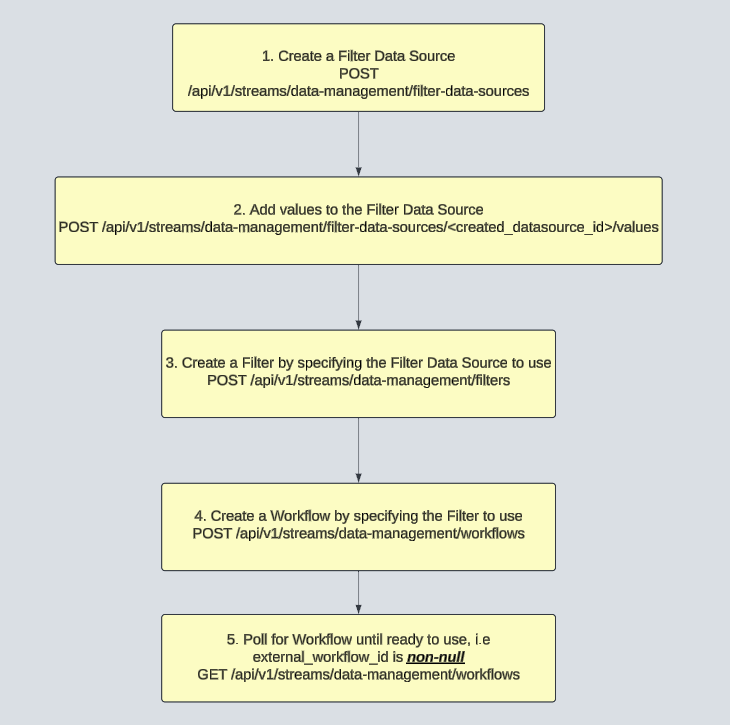 Check out the [Datastream APIs](/api/datastreams/overview) for all the endpoints to manage your stream transformations programmatically.
## Key Components
Reusable value lists that act as dynamic "contains" filters
Rules that determine which messages pass through
Complete pipelines connecting source → filter → destination
## Example: Monitor Ethereum Wallet Activities
This example demonstrates how to monitor activities on 10 Ethereum wallet addresses.
Create a data source to hold your list of Ethereum addresses.
### Request
```bash theme={null}
curl --location 'https://api.allium.so/api/v1/streams/data-management/filter-data-sources' \
--header 'X-API-KEY: ' \
--header 'Content-Type: application/json' \
--data '{
"name": "Ethereum Addresses",
"type": "string_array",
"description": "Allowlist of Ethereum addresses for transactions we want to track."
}'
```
### Response
```json theme={null}
{
"id": "3123712-aqw1-asdg-0293-1f48914e1e3f",
"name": "Ethereum Addresses",
"type": "string_array",
"description": "Allowlist of Ethereum addresses for transactions we want to track."
}
```
Add the Ethereum addresses you want to track. Changes take effect immediately on running workflows.
```bash theme={null}
curl --location 'https://api.allium.so/api/v1/streams/data-management/filter-data-sources/3123712-aqw1-asdg-0293-1f48914e1e3f/values' \
--header 'X-API-KEY: ' \
--header 'Content-Type: application/json' \
--data '{
"operation": "ADD",
"values": [
"0x0dfcac7b81015ea777f79d4e2f03980091ea0333",
"0x0dfcac7b81015ea777f79d4e2f03980091ea1333",
"0x0dfcac7b81015ea777f79d4e2f03980091ea2333",
"0x0dfcac7b81015ea777f79d4e2f03980091ea3333",
"0x0dfcac7b81015ea777f79d4e2f03980091ea4333",
"0x0dfcac7b81015ea777f79d4e2f03980091ea5333",
"0x0dfcac7b81015ea777f79d4e2f03980091ea6333",
"0x0dfcac7b81015ea777f79d4e2f03980091ea7333",
"0x0dfcac7b81015ea777f79d4e2f03980091ea8333",
"0x0dfcac7b81015ea777f79d4e2f03980091ea9333"
]
}'
```
```bash theme={null}
curl --location 'https://api.allium.so/api/v1/streams/data-management/filter-data-sources/3123712-aqw1-asdg-0293-1f48914e1e3f/values' \
--header 'X-API-KEY: ' \
--header 'Content-Type: application/json' \
--data '{
"operation": "DELETE",
"values": [
"0x0dfcac7b81015ea777f79d4e2f03980091ea2333"
]
}'
```
Create a filter that applies your data source to the Ethereum transactions stream.
Filters support comparison operators (`=`, `!=`, `>`, `>=`, `<`, `<=`), the `in` operator for matching against arrays or data sources, the `exists` operator for field presence checks, and compound AND/OR logic for complex conditions.
See the [Filter Syntax](/datastreams/filters) documentation for complete details on all operators, nested conditions, and examples.
### Request
```bash theme={null}
curl --location 'https://api.allium.so/api/v1/streams/data-management/filters' \
--header 'X-API-KEY: ' \
--header 'Content-Type: application/json' \
--data '{
"filter": {
"field": "address",
"operator": "in",
"data_source_id": "3123712-aqw1-asdg-0293-1f48914e1e3f"
}
}'
```
### Response
```json theme={null}
{
"id": "afas231k-das9-1232-als1-a89c32ca3c57",
"filter": {
"field": "address",
"operator": "in",
"value": [
"0x0dfcac7b81015ea777f79d4e2f03980091ea0333",
"0x0dfcac7b81015ea777f79d4e2f03980091ea1333",
"0x0dfcac7b81015ea777f79d4e2f03980091ea2333",
"0x0dfcac7b81015ea777f79d4e2f03980091ea3333",
"0x0dfcac7b81015ea777f79d4e2f03980091ea4333",
"0x0dfcac7b81015ea777f79d4e2f03980091ea5333",
"0x0dfcac7b81015ea777f79d4e2f03980091ea6333",
"0x0dfcac7b81015ea777f79d4e2f03980091ea7333",
"0x0dfcac7b81015ea777f79d4e2f03980091ea8333",
"0x0dfcac7b81015ea777f79d4e2f03980091ea9333"
]
}
}
```
The response shows the filter has been created with the values from your data source expanded into the `value` array.
Configure a workflow to publish filtered transactions to your webhook.
### Request
```bash theme={null}
curl --location 'https://api.allium.so/api/v1/streams/data-management/workflows' \
--header 'X-API-KEY: ' \
--header 'Content-Type: application/json' \
--data '{
"description": "Ethereum transactions workflow",
"filter_id": "afas231k-das9-1232-als1-a89c32ca3c57",
"data_source_config": {
"type": "PUBSUB",
"topic": "ethereum.transactions"
},
"data_destination_config": {
"type": "PUBSUB",
"delivery_type": "PUSH",
"webhook_url": "https://my-ethereum-transactions-webhook.a.run.app/"
}
}'
```
### Response
```json theme={null}
{
"id": "50225675-69a6-4abc-bfdc-1ad0b1a223f9",
"description": "Ethereum transactions workflow",
"filter_id": "afas231k-das9-1232-als1-a89c32ca3c57",
"data_source_config": {
"type": "PUBSUB",
"topic": "ethereum.transactions"
},
"data_destination_config": {
"type": "PUBSUB",
"topic": "allium.ethereum.transactions.data_transformation.abc56e30-0cfb-4998-804d-8fc2fe0065fc",
"subscription": "allium_app.allium.ethereum.transactions.destination.data_transformation.abc56e30-0cfb-4998-804d-8fc2fe0065fc.push",
"delivery_type": "PUSH",
"webhook_url": "https://my-ethereum-transactions-webhook.a.run.app/"
},
"external_workflow_id": null,
"status": "running"
}
```
Poll the workflow until `external_workflow_id` is non-null, indicating your webhook is receiving filtered transactions.
### Request
```bash theme={null}
curl --location 'https://api.allium.so/api/v1/streams/data-management/workflows/50225675-69a6-4abc-bfdc-1ad0b1a223f9' \
--header 'X-API-KEY: '
```
## Next Steps
Learn how to filter streams with complex conditions
Check out the [Datastream APIs](/api/datastreams/overview) for all the endpoints to manage your stream transformations programmatically.
## Key Components
Reusable value lists that act as dynamic "contains" filters
Rules that determine which messages pass through
Complete pipelines connecting source → filter → destination
## Example: Monitor Ethereum Wallet Activities
This example demonstrates how to monitor activities on 10 Ethereum wallet addresses.
Create a data source to hold your list of Ethereum addresses.
### Request
```bash theme={null}
curl --location 'https://api.allium.so/api/v1/streams/data-management/filter-data-sources' \
--header 'X-API-KEY: ' \
--header 'Content-Type: application/json' \
--data '{
"name": "Ethereum Addresses",
"type": "string_array",
"description": "Allowlist of Ethereum addresses for transactions we want to track."
}'
```
### Response
```json theme={null}
{
"id": "3123712-aqw1-asdg-0293-1f48914e1e3f",
"name": "Ethereum Addresses",
"type": "string_array",
"description": "Allowlist of Ethereum addresses for transactions we want to track."
}
```
Add the Ethereum addresses you want to track. Changes take effect immediately on running workflows.
```bash theme={null}
curl --location 'https://api.allium.so/api/v1/streams/data-management/filter-data-sources/3123712-aqw1-asdg-0293-1f48914e1e3f/values' \
--header 'X-API-KEY: ' \
--header 'Content-Type: application/json' \
--data '{
"operation": "ADD",
"values": [
"0x0dfcac7b81015ea777f79d4e2f03980091ea0333",
"0x0dfcac7b81015ea777f79d4e2f03980091ea1333",
"0x0dfcac7b81015ea777f79d4e2f03980091ea2333",
"0x0dfcac7b81015ea777f79d4e2f03980091ea3333",
"0x0dfcac7b81015ea777f79d4e2f03980091ea4333",
"0x0dfcac7b81015ea777f79d4e2f03980091ea5333",
"0x0dfcac7b81015ea777f79d4e2f03980091ea6333",
"0x0dfcac7b81015ea777f79d4e2f03980091ea7333",
"0x0dfcac7b81015ea777f79d4e2f03980091ea8333",
"0x0dfcac7b81015ea777f79d4e2f03980091ea9333"
]
}'
```
```bash theme={null}
curl --location 'https://api.allium.so/api/v1/streams/data-management/filter-data-sources/3123712-aqw1-asdg-0293-1f48914e1e3f/values' \
--header 'X-API-KEY: ' \
--header 'Content-Type: application/json' \
--data '{
"operation": "DELETE",
"values": [
"0x0dfcac7b81015ea777f79d4e2f03980091ea2333"
]
}'
```
Create a filter that applies your data source to the Ethereum transactions stream.
Filters support comparison operators (`=`, `!=`, `>`, `>=`, `<`, `<=`), the `in` operator for matching against arrays or data sources, the `exists` operator for field presence checks, and compound AND/OR logic for complex conditions.
See the [Filter Syntax](/datastreams/filters) documentation for complete details on all operators, nested conditions, and examples.
### Request
```bash theme={null}
curl --location 'https://api.allium.so/api/v1/streams/data-management/filters' \
--header 'X-API-KEY: ' \
--header 'Content-Type: application/json' \
--data '{
"filter": {
"field": "address",
"operator": "in",
"data_source_id": "3123712-aqw1-asdg-0293-1f48914e1e3f"
}
}'
```
### Response
```json theme={null}
{
"id": "afas231k-das9-1232-als1-a89c32ca3c57",
"filter": {
"field": "address",
"operator": "in",
"value": [
"0x0dfcac7b81015ea777f79d4e2f03980091ea0333",
"0x0dfcac7b81015ea777f79d4e2f03980091ea1333",
"0x0dfcac7b81015ea777f79d4e2f03980091ea2333",
"0x0dfcac7b81015ea777f79d4e2f03980091ea3333",
"0x0dfcac7b81015ea777f79d4e2f03980091ea4333",
"0x0dfcac7b81015ea777f79d4e2f03980091ea5333",
"0x0dfcac7b81015ea777f79d4e2f03980091ea6333",
"0x0dfcac7b81015ea777f79d4e2f03980091ea7333",
"0x0dfcac7b81015ea777f79d4e2f03980091ea8333",
"0x0dfcac7b81015ea777f79d4e2f03980091ea9333"
]
}
}
```
The response shows the filter has been created with the values from your data source expanded into the `value` array.
Configure a workflow to publish filtered transactions to your webhook.
### Request
```bash theme={null}
curl --location 'https://api.allium.so/api/v1/streams/data-management/workflows' \
--header 'X-API-KEY: ' \
--header 'Content-Type: application/json' \
--data '{
"description": "Ethereum transactions workflow",
"filter_id": "afas231k-das9-1232-als1-a89c32ca3c57",
"data_source_config": {
"type": "PUBSUB",
"topic": "ethereum.transactions"
},
"data_destination_config": {
"type": "PUBSUB",
"delivery_type": "PUSH",
"webhook_url": "https://my-ethereum-transactions-webhook.a.run.app/"
}
}'
```
### Response
```json theme={null}
{
"id": "50225675-69a6-4abc-bfdc-1ad0b1a223f9",
"description": "Ethereum transactions workflow",
"filter_id": "afas231k-das9-1232-als1-a89c32ca3c57",
"data_source_config": {
"type": "PUBSUB",
"topic": "ethereum.transactions"
},
"data_destination_config": {
"type": "PUBSUB",
"topic": "allium.ethereum.transactions.data_transformation.abc56e30-0cfb-4998-804d-8fc2fe0065fc",
"subscription": "allium_app.allium.ethereum.transactions.destination.data_transformation.abc56e30-0cfb-4998-804d-8fc2fe0065fc.push",
"delivery_type": "PUSH",
"webhook_url": "https://my-ethereum-transactions-webhook.a.run.app/"
},
"external_workflow_id": null,
"status": "running"
}
```
Poll the workflow until `external_workflow_id` is non-null, indicating your webhook is receiving filtered transactions.
### Request
```bash theme={null}
curl --location 'https://api.allium.so/api/v1/streams/data-management/workflows/50225675-69a6-4abc-bfdc-1ad0b1a223f9' \
--header 'X-API-KEY: '
```
## Next Steps
Learn how to filter streams with complex conditions