

Answer
SQL, curated metrics, Terminal, labels, and web search
Visualize
Inline charts and interactive dashboards
Share
Public links, forkable sessions, social posts, PDFs
Automate
Custom skills and organization memory
Bring context
Files, screenshots, and the tab you are on
Build
Beam pipelines and live web apps
Everything on this page runs in the Allium App. To give your own agent the same tools, see Allium MCP.
Answer questions
Ask in plain English. The Assistant uses the fastest source that answers the question correctly, in this order:
Answers from the metrics catalog and Terminal match the numbers Allium publishes. Terminal results are precomputed, and the Assistant tells you when they were last refreshed.
Metrics catalog
AskWhat was daily stablecoin supply on Ethereum, Tron and Solana over the last 30 days? The Assistant lists the catalog metrics, pulls circulating supply split by chain, and answers with a table of the 30-day change: Ethereum goes from $173.80B to $173.64B (-0.1%), Tron from $93.82B to $94.22B (+0.4%), and Solana from $15.86B to $16.28B (+2.6%).
Asking Allium Assistant for stablecoin supply on Ethereum, Tron, and Solana
Terminal dashboards
AskIs there an Allium Terminal dashboard on stablecoin supply by chain? Show me what it says. The Assistant searches Terminal, reads the results of the closest dashboard, and answers with a link to it and its supply-by-chain numbers for USDC and USDT. In this recording, no dashboard covers all stablecoins in one view, so the Assistant used the closest one. The flow can differ between runs.
Asking Allium Assistant to find a Terminal dashboard on stablecoin supply
Address labels
AskWho is 0x28C6c06298d514Db089934071355E5743bf21d60? The Assistant looks up Allium’s address labels and returns the entity (Binance), the category (Exchange (CEX)), and the chains where the address appears.
Asking Allium Assistant who owns an Ethereum address
What a SQL answer looks like, step by step
What a SQL answer looks like, step by step
- Search schemas and docs to find the right tables and columns.
- Load Allium’s SQL guidance: partition pruning, address casing, and when to use
*.metrics.*tables instead of raw aggregation. - Write the query and validate it with
EXPLAIN. - Run it on your session’s compute profile. The step shows the Explorer Units (EUs) it used.
- Summarize the result. When you want to keep a query, or chart it, the Assistant saves it to Explorer, so you can open, edit, and rerun it.
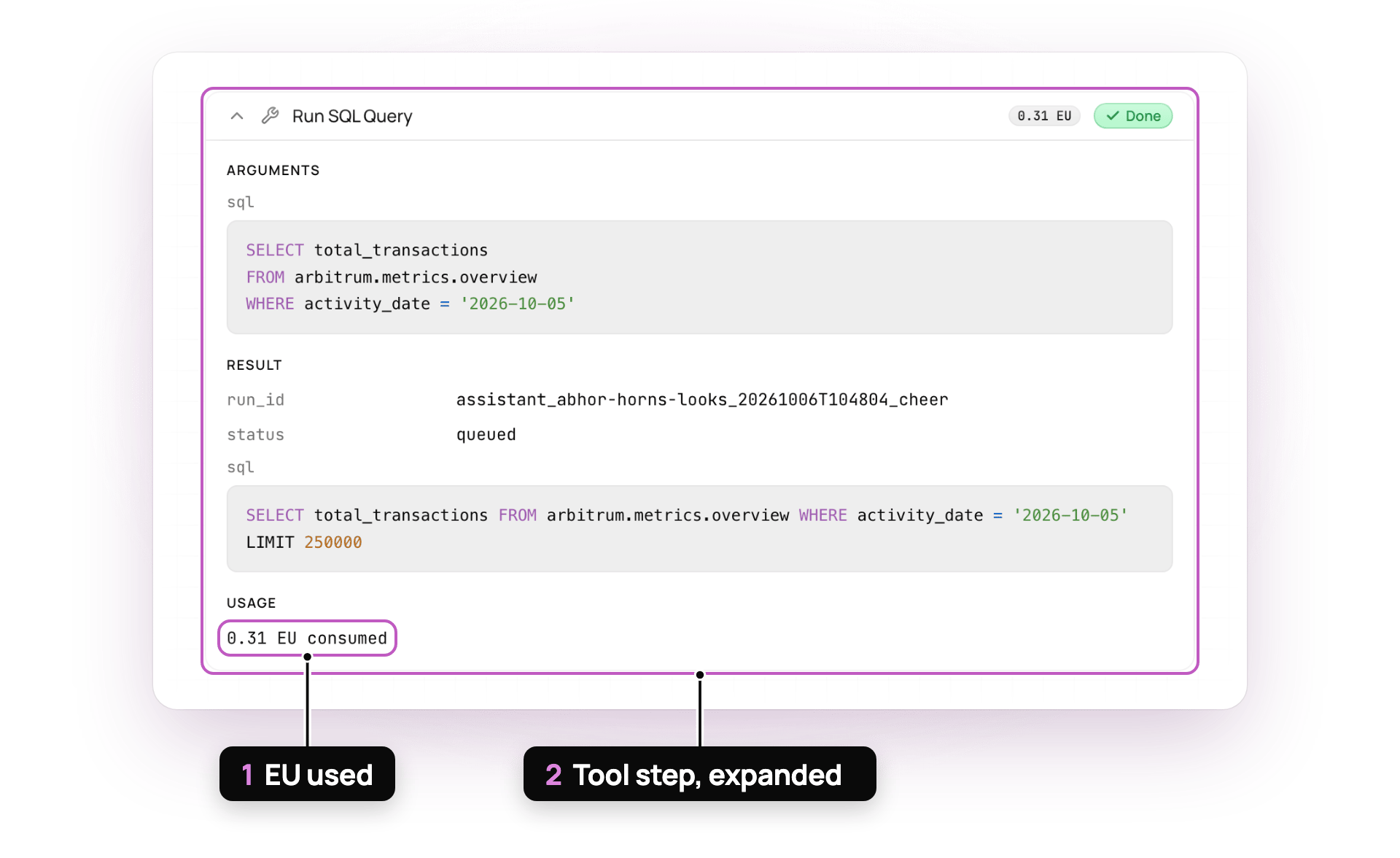
A query step, opened up
- EU used
- Tool step, expanded
Prices, balances, and wallet history are answered with SQL over Allium’s tables, so you get full history and cross-chain aggregation at Explorer freshness. For sub-second lookups in your own app, use the Realtime APIs.
Chart and build dashboards
The Assistant charts query results when a chart helps, and the chart renders in the conversation. Ask for a different shape at any time: “make that a stacked area”, “switch to weekly”. AskCompare daily DEX volume on Base, Arbitrum and Solana over the last 30 days and chart it. The Assistant fetches the data, builds a chart in the conversation, and summarizes the takeaways below it.
Asking Allium Assistant to chart daily DEX volume on Base, Arbitrum, and Solana
Build a dashboard of daily DEX volume and unique traders on Base and Arbitrum over the last 30 days. The Assistant builds the dashboard and links it in the conversation. It opens next to your session, with a line chart of daily DEX volume and a line chart of daily unique traders, one line per chain.
Asking Allium Assistant for a Base and Arbitrum DEX dashboard
Dashboards are saved to Explorer, and the charts stay attached to their queries. When a query changes, its charts update.
Share and export
A fork copies the messages only. Queries and dashboards that the Assistant created stay with the original owner. To stop sharing a dashboard or query, turn off public access in the App. A shared conversation link cannot be turned off, so share only what you are happy to publish.
Automate recurring work
Custom skills
Save a prompt as
/daily-movers and run it with one keystroke. Private to your user.Organization memory
Store treasury addresses, focus chains, and definitions once. Every conversation uses them.
Bring your own context
Use files to give the Assistant a list of addresses to check, a research PDF to compare against onchain data, or a screenshot of a chart you want reproduced.
The Assistant reads a file’s contents. It cannot run SQL against an uploaded file. For Excel files, it reads the first sheet. Large CSV, Excel, and Word files are cut to about 1,000 lines.
Build pipelines and apps
- Beam pipelines
- Web apps
Create streaming pipelines that filter and transform blockchain events and deliver them to Kafka topics.The Assistant writes the pipeline config, deploys the workers, and returns Kafka credentials with Python and TypeScript consumer snippets. Create, update, deploy, tear down, and monitor pipelines from the chat. See Beam.
Beam pipelines are available to organizations with Custom Transforms. Contact [email protected] for access.
Stay in control
Press
Shift+Tab in the composer to switch between Auto and Manual.
How the Assistant stays accurate
Allium's skills
Allium's skills
Before it writes SQL or builds a dashboard, the Assistant loads Allium’s own guidance: SQL optimization rules, chain-specific pitfalls, dashboard and chart specs, product guidance, and the dated list of supported chains. Your agent can load the same guidance through Skills over MCP.
Specialist subagents
Specialist subagents
For heavy steps, the Assistant hands off to a focused subagent and keeps only the result:
- SQL expert: iterates on a complex query until it validates and runs
- Docs expert: researches across many documentation pages
- Dashboard generator: assembles a multi-element dashboard, starting from Terminal
- PDF report generator: lays out a report
Questions back to you
Questions back to you
When a request is ambiguous, such as which chains or what time window, the Assistant asks a short multiple-choice question before it spends compute.