

General
Sample queries for Hyperliquid historical data. This queries are applicable to Hyperliquid data on Snowflake dat awarehouse. Get total monthly DEX volume on Hyperliquid over time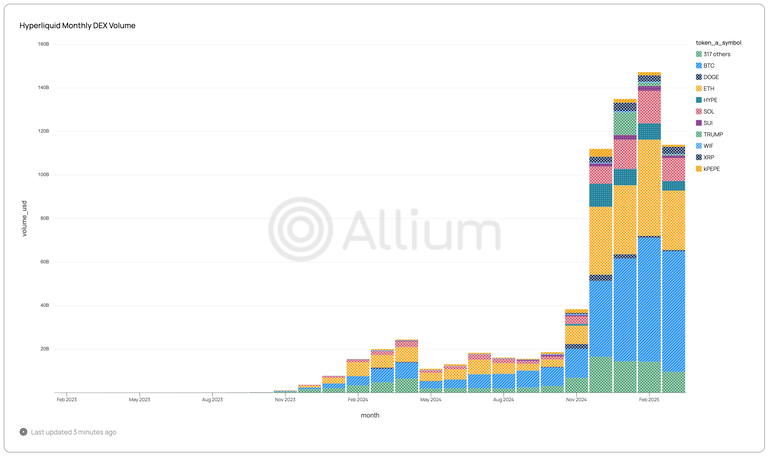
SELECT
    DATE_TRUNC('MONTH', timestamp) AS month,
    token_a_symbol,
    SUM(usd_amount) AS volume_usd
FROM hyperliquid.dex.trades
GROUP BY ALL
select
    *
from hyperliquid.dex.trades
where 1=1
    and (buyer_address = <address_to_search> or seller_address = <address_to_search>)
select
    *
from hyperliquid.dex.trades
where 1=1
    and token_a_symbol = 'BTC'
    and timestamp >= current_timestamp - interval '24 hours'
select
    token_a_symbol,
    sum(case when market_type = 'spot' then usd_amount else 0 end) as total_spot_usd_amount,
    sum(case when market_type = 'perpetuals' then usd_amount else 0 end) as total_perpetuals_usd_amount,
    sum(usd_amount) as total_usd_amount,
from hyperliquid.dex.trades
where 1=1
    and timestamp >= current_timestamp - interval '24 hours'
group by all
order by total_usd_amount desc
select
    date(timestamp) as day,
    token_a_symbol,
    count(distinct buyer_address) as num_buyers,
    count(distinct seller_address) as num_sellers,
    sum(usd_amount) as total_usd_amount,
from hyperliquid.dex.trades
where 1=1
    and timestamp >= current_timestamp - interval '7 days'
group by all
order by 1 asc
By Use Case
- Market Structure Insights
- Behaviour Analysis
- Liquidity Movement Patterns
We can use some simple queries to view market resistance levels for the last 24 hours. (For more sophisticated clustering consider exporting the data and usind statiscal tools to identify clusters.)
Please be advised that this data is currently incomplete as open orders are still missing. We are working to complete this data set. However this will give you some sense of the levels.
- Limit losses levels
- The query below give you levels where traders are more likely to sell to limit their losses.
-- Dynamic binning for Stop orders based on each coin's price range
WITH coin_price_ranges AS (
    SELECT
        COIN,
        MIN(TRIGGER_PRICE) as min_price,
        MAX(TRIGGER_PRICE) as max_price,
        (MAX(TRIGGER_PRICE) - MIN(TRIGGER_PRICE))/20 as bin_size -- Create 20 bins across the range
    FROM hyperliquid.raw.orders
    WHERE IS_TAKE_PROFIT_OR_STOP_LOSS = TRUE
    AND TYPE IN ('Stop Market', 'Stop Limit')
    AND STATUS_CHANGE_TIMESTAMP >= DATEADD(hour, -24, CURRENT_TIMESTAMP())
    GROUP BY COIN
)

SELECT
    o.COIN,
    'Stop Orders' as order_category,
    FLOOR(o.TRIGGER_PRICE / NULLIF(r.bin_size, 0)) * r.bin_size as price_bin_start,
    (FLOOR(o.TRIGGER_PRICE / NULLIF(r.bin_size, 0)) + 1) * r.bin_size as price_bin_end,
    COUNT(*) as order_count
FROM hyperliquid.raw.orders o
JOIN coin_price_ranges r ON o.COIN = r.COIN
WHERE o.IS_TAKE_PROFIT_OR_STOP_LOSS = TRUE
AND o.TYPE IN ('Stop Market', 'Stop Limit')
AND o.STATUS_CHANGE_TIMESTAMP >= DATEADD(hour, -24, CURRENT_TIMESTAMP())
GROUP BY o.COIN, order_category, FLOOR(o.TRIGGER_PRICE / NULLIF(r.bin_size, 0)) * r.bin_size, (FLOOR(o.TRIGGER_PRICE / NULLIF(r.bin_size, 0)) + 1) * r.bin_size
ORDER BY o.COIN, price_bin_start;
- Take Profit Levels
- This will give you the levels where traders are more likely to take profits.
-- Dynamic binning for Take Profit orders based on each coin's price range
WITH coin_price_ranges AS (
    SELECT
        COIN,
        MIN(TRIGGER_PRICE) as min_price,
        MAX(TRIGGER_PRICE) as max_price,
        (MAX(TRIGGER_PRICE) - MIN(TRIGGER_PRICE))/20 as bin_size -- Create 20 bins across the range
    FROM hyperliquid.raw.orders
    WHERE IS_TAKE_PROFIT_OR_STOP_LOSS = TRUE
    AND TYPE IN ('Take Profit Market', 'Take Profit Limit')
    AND STATUS_CHANGE_TIMESTAMP >= DATEADD(hour, -24, CURRENT_TIMESTAMP())
    GROUP BY COIN
)

SELECT
    o.COIN,
    'Take Profit Orders' as order_category,
    FLOOR(o.TRIGGER_PRICE / NULLIF(r.bin_size, 0)) * r.bin_size as price_bin_start,
    (FLOOR(o.TRIGGER_PRICE / NULLIF(r.bin_size, 0)) + 1) * r.bin_size as price_bin_end,
    COUNT(*) as order_count
FROM hyperliquid.raw.orders o
JOIN coin_price_ranges r ON o.COIN = r.COIN
WHERE o.IS_TAKE_PROFIT_OR_STOP_LOSS = TRUE
AND o.TYPE IN ('Take Profit Market', 'Take Profit Limit')
AND o.STATUS_CHANGE_TIMESTAMP >= DATEADD(hour, -24, CURRENT_TIMESTAMP())
GROUP BY o.COIN, order_category, FLOOR(o.TRIGGER_PRICE / NULLIF(r.bin_size, 0)) * r.bin_size, (FLOOR(o.TRIGGER_PRICE / NULLIF(r.bin_size, 0)) + 1) * r.bin_size
ORDER BY o.COIN, price_bin_start;
- Circular Trading - two addresses trading back and forth
WITH trading_pairs AS (
    SELECT
        BUYER_ADDRESS,
        SELLER_ADDRESS,
        COIN,
        COUNT(*) as trade_count,
        SUM(USD_AMOUNT) as total_volume
    FROM hyperliquid.dex.trades
    WHERE TIMESTAMP >= DATEADD(day, -30, CURRENT_TIMESTAMP()) -- Last 30 days
    GROUP BY BUYER_ADDRESS, SELLER_ADDRESS, COIN
    HAVING COUNT(*) >= 10 -- At least 10 trades between the same pair
),
reverse_pairs AS (
    SELECT
        a.BUYER_ADDRESS,
        a.SELLER_ADDRESS,
        a.COIN,
        a.trade_count as forward_count,
        b.trade_count as reverse_count,
        a.total_volume as forward_volume,
        b.total_volume as reverse_volume
    FROM trading_pairs a
    JOIN trading_pairs b ON a.BUYER_ADDRESS = b.SELLER_ADDRESS
                         AND a.SELLER_ADDRESS = b.BUYER_ADDRESS
                         AND a.COIN = b.COIN
    WHERE a.BUYER_ADDRESS < a.SELLER_ADDRESS -- To avoid duplicate pairs
)

SELECT
    BUYER_ADDRESS,
    SELLER_ADDRESS,
    COIN,
    forward_count,
    reverse_count,
    forward_count + reverse_count as total_trades,
    forward_volume,
    reverse_volume,
    forward_volume + reverse_volume as total_volume,
    ABS(forward_count - reverse_count) / (forward_count + reverse_count) as trade_count_imbalance,
    ABS(forward_volume - reverse_volume) / (forward_volume + reverse_volume) as volume_imbalance
FROM reverse_pairs
ORDER BY total_trades DESC;
Monitor big movements
Predict what is happening in the market
- Identify top sellers in the last month
SELECT
    SELLER_ADDRESS,
    SUM(USD_AMOUNT) as TOTAL_SOLD_USD,
    COUNT(*) as NUMBER_OF_SALES
FROM hyperliquid.dex.trades
WHERE TIMESTAMP >= DATEADD(month, -1, CURRENT_TIMESTAMP())
  AND SELLER_ADDRESS IS NOT NULL
GROUP BY SELLER_ADDRESS
ORDER BY TOTAL_SOLD_USD DESC
LIMIT 20;
- Identify Top Buyers
SELECT
    BUYER_ADDRESS,
    SUM(USD_AMOUNT) as TOTAL_BOUGHT_USD,
    COUNT(*) as NUMBER_OF_PURCHASES
FROM hyperliquid.dex.trades
WHERE TIMESTAMP >= DATEADD(month, -1, CURRENT_TIMESTAMP())
  AND BUYER_ADDRESS IS NOT NULL
GROUP BY BUYER_ADDRESS
ORDER BY TOTAL_BOUGHT_USD DESC
LIMIT 20;
- Monitor the above addresses for open trades (coming soon)
For now you can view what these whales have been doing by removing the o.STATUS = ‘open’, which will show you all the order status changes, so will capture a lot of the movement, but any orders that were placed and have not been cancelled, modified or filled, will not be visible.
-- First, create a CTE (Common Table Expression) with top sellers
WITH top_sellers AS (
    SELECT
        SELLER_ADDRESS as ADDRESS
    FROM hyperliquid.dex.trades
    WHERE TIMESTAMP >= DATEADD(month, -1, CURRENT_TIMESTAMP())
      AND SELLER_ADDRESS IS NOT NULL
    GROUP BY SELLER_ADDRESS
    ORDER BY SUM(USD_AMOUNT) DESC
    LIMIT 10
),
-- Create a CTE with top buyers
top_buyers AS (
    SELECT
        BUYER_ADDRESS as ADDRESS
    FROM hyperliquid.dex.trades
    WHERE TIMESTAMP >= DATEADD(month, -1, CURRENT_TIMESTAMP())
      AND BUYER_ADDRESS IS NOT NULL
    GROUP BY BUYER_ADDRESS
    ORDER BY SUM(USD_AMOUNT) DESC
    LIMIT 10
),
-- Combine the two lists (with possible duplicates)
top_traders AS (
    SELECT ADDRESS FROM top_sellers
    UNION
    SELECT ADDRESS FROM top_buyers
)
-- Now query the orders table for these addresses
SELECT
    o.CLIENT_ORDER_ID,
    o.ORDER_ID,
    o.COIN,
    o.IS_TAKE_PROFIT_OR_STOP_LOSS,
    o.IS_TRIGGER,
    o.TYPE,
    o.ORIGINAL_SIZE,
    o.IS_REDUCE_ONLY,
    o.SIDE,
    o.SIZE,
    o.TIME_IN_FORCE,
    o.ORDER_TIMESTAMP,
    o.TRIGGER_CONDITION,
    o.TRIGGER_PRICE,
    o.LIMIT_PRICE,
    o.CHILDREN,
    o.STATUS,
    o.USER,
    o.STATUS_CHANGE_TIMESTAMP
FROM hyperliquid.raw.orders o
JOIN top_traders t ON o.USER = t.ADDRESS
WHERE o.STATUS = 'open'
  AND o.ORDER_TIMESTAMP >= DATEADD(hour, -24, CURRENT_TIMESTAMP())
ORDER BY o.ORDER_TIMESTAMP DESC;
- Most profitable traders
WITH buyer_pnl AS (
    SELECT
        BUYER_ADDRESS AS ADDRESS,
        SUM(CAST(PARSE_JSON(_EXTRA_FIELDS):buyer:closed_pnl as FLOAT)) AS BUYER_TOTAL_PNL
    FROM hyperliquid.dex.trades
    WHERE _EXTRA_FIELDS IS NOT NULL
      AND PARSE_JSON(_EXTRA_FIELDS):buyer:closed_pnl IS NOT NULL
      AND BUYER_ADDRESS IS NOT NULL
      AND TIMESTAMP >= DATEADD(day, -7, CURRENT_TIMESTAMP())
    GROUP BY BUYER_ADDRESS
),

seller_pnl AS (
    SELECT
        SELLER_ADDRESS AS ADDRESS,
        SUM(CAST(PARSE_JSON(_EXTRA_FIELDS):seller:closed_pnl as FLOAT)) AS SELLER_TOTAL_PNL
    FROM hyperliquid.dex.trades
    WHERE _EXTRA_FIELDS IS NOT NULL
      AND PARSE_JSON(_EXTRA_FIELDS):seller:closed_pnl IS NOT NULL
      AND SELLER_ADDRESS IS NOT NULL
      AND TIMESTAMP >= DATEADD(day, -7, CURRENT_TIMESTAMP())
    GROUP BY SELLER_ADDRESS
),

combined_pnl AS (
    SELECT
        COALESCE(b.ADDRESS, s.ADDRESS) AS ADDRESS,
        COALESCE(b.BUYER_TOTAL_PNL, 0) AS BUYER_TOTAL_PNL,
        COALESCE(s.SELLER_TOTAL_PNL, 0) AS SELLER_TOTAL_PNL,
        COALESCE(b.BUYER_TOTAL_PNL, 0) + COALESCE(s.SELLER_TOTAL_PNL, 0) AS TOTAL_PNL
    FROM buyer_pnl b
    FULL OUTER JOIN seller_pnl s ON b.ADDRESS = s.ADDRESS
)

SELECT
    ADDRESS,
    BUYER_TOTAL_PNL,
    SELLER_TOTAL_PNL,
    TOTAL_PNL,
    CASE
        WHEN TOTAL_PNL > 0 THEN 'Profitable'
        WHEN TOTAL_PNL < 0 THEN 'Loss'
        ELSE 'Breakeven'
    END AS PERFORMANCE
FROM combined_pnl
ORDER BY TOTAL_PNL DESC
LIMIT 100;
Builder Fees
- Average fee by builder address
-- avg fee by builder address
SELECT
    action:builder:b as builder_address,
    COUNT(*) as transaction_count,
    AVG(action:builder:f) as average_fee
FROM hyperliquid.raw.transactions
WHERE action:builder:b IS NOT NULL
GROUP BY action:builder:b
ORDER BY average_fee DESC;
- Min, Max and Avg - Max Builder Fee per builder builder
SELECT
    action:builder as builder_address,

    MIN(
        TRY_TO_DECIMAL(
            REPLACE(
                REPLACE(action:maxFeeRate::string, '%', ''),
                ' ', ''
            )
        ) / 100
    ) as min_max_fee_rate,

    MAX(
        TRY_TO_DECIMAL(
            REPLACE(
                REPLACE(action:maxFeeRate::string, '%', ''),
                ' ', ''
            )
        ) / 100
    ) as max_max_fee_rate,

    AVG(
        TRY_TO_DECIMAL(
            REPLACE(
                REPLACE(action:maxFeeRate::string, '%', ''),
                ' ', ''
            )
        ) / 100
    ) as avg_max_fee_rate,

    COUNT(*) as approval_count,
    MIN(action:nonce) as first_approval,
    MAX(action:nonce) as latest_approval
FROM hyperliquid.raw.transactions
WHERE action:type::string = 'approveBuilderFee'
  AND action:maxFeeRate IS NOT NULL
GROUP BY builder_address
ORDER BY avg_max_fee_rate DESC;
Vaults
- Transfers, deposits by vault and user
SELECT
    user,
    action:vaultAddress AS vault_address,
    SUM(CASE WHEN action:isDeposit = true THEN action:usd ELSE 0 END) AS total_deposits,
    SUM(CASE WHEN action:isDeposit = false THEN action:usd ELSE 0 END) AS total_withdrawals
FROM hyperliquid.raw.transactions
WHERE action:type = 'vaultTransfer'
GROUP BY user, vault_address
ORDER BY user, vault_address;
- Transfers and deposits by vault
SELECT
    action:vaultAddress AS vault_address,
    SUM(CASE WHEN action:isDeposit = true THEN action:usd ELSE 0 END) AS total_deposits,
    SUM(CASE WHEN action:isDeposit = false THEN action:usd ELSE 0 END) AS total_withdrawals,
    COUNT(DISTINCT user) AS users
FROM hyperliquid.raw.transactions
WHERE action:type = 'vaultTransfer'
GROUP BY vault_address
ORDER BY total_deposits DESC;
HyperCore <> HyperEVM
Transfers
HyperCore -> HyperEVM
SELECT *
FROM hyperliquid.raw.transactions
WHERE
  action:type = 'SystemSpotSendAction'
LIMIT 2;
action:destination will be the user address it is going to.
So to filter by user you would do
SELECT *
FROM hyperliquid.raw.transactions
WHERE
  action:type = 'SystemSpotSendAction'
AND
  action:destination = '0x6b00f08f81d81fec5154b6e807acd4613cd16795'
LIMIT 2;
HyperEVM -> HyperCore
SELECT *
FROM hyperliquid.raw.transactions
WHERE
  action:type = 'spotSend'
AND
(
  action:destination like '0x20%'
  OR
  action:destination = '0x2222222222222222222222222222222222222222'
)
LIMIT 2;
Every token has a system address on the Core, which is the address with first byteTo filter by user, use the user column, as the token will be deposited in the address of the user who intiated the transaction.0x20and the remaining bytes all zeros, except for the token index encoded in big-endian format. The exception is HYPE, which has a system address of0x2222222222222222222222222222222222222222.
SELECT *
FROM hyperliquid.raw.transactions
WHERE
  action:type = 'spotSend'
AND
(
  action:destination like '0x20%'
  OR
  action:destination = '0x2222222222222222222222222222222222222222'
)
AND
  user = '0xc0617cf0557378d4d53fd17320ae4e6e2c27e468'
LIMIT 2;